First previewed during the Matrix Conference and detailed in the Glimpse into the Future blog post, the vision for a faster, more intuitive way to organise conversations is now a reality as Spaces are now officially available on Element X!
This update brings a sophisticated digital architecture to the experience, replacing long room lists with structured, context-driven communication.
What are Spaces?
Think of Spaces as the digital architecture of your communication. Instead of an overwhelming list of individual rooms, Element uses Spaces to group related conversations into navigable, virtual containers. This structure delivers two primary benefits for organisational scaling:
- Effortless room discovery: Spaces provide an immediate overview of a specific team or project. Users can instantly see all relevant channels - for example, every room belonging to "Team X" or "Project Y" - ensuring that the right people always find the right conversations.
- Simplified access management: Element allows rooms to be configured so any member of a Space can join them without needing an invitation. This streamlines onboarding while still offering the flexibility to keep specific rooms within that Space "invite-only" for sensitive topics.
By organising by department, project, or interest, Spaces allow for seamless context switching. Users can move from a focused "Product Team" environment to a "Company News" world with a single tap - ensuring mission-critical focus and general updates stay perfectly separated.
Automated organisation for admins
Spaces isn’t just about better organisation for users; it’s a powerful tool for administrators. If you are using Element Server Suite Pro (ESS Pro), you can now mirror your organisation’s actual structure directly within the app.
With automated memberships and permissions, admins can automatically assign users to the correct Spaces and rooms. For example, all members of your “IT Department” can be automatically added to the “IT” Space with the appropriate access rights the moment they join. This gives admins granular control over who can access, read and participate in conversations, ensuring your workspace remains secure and organised.
What’s new?
Spaces on Element X isn't just a port of the old system; it’s a complete redesign built for speed, reliability and clarity. As we modernise Element across Web, Desktop and Mobile, we are ensuring that Spaces feel like a native, seamless part of your workflow.
1. A smarter, cleaner chat list
To keep the chat list clean and actionable, Element X utilises a high-level filtering system. Instead of clunky folders, a quick filter at the top of the chat list allows users to instantly narrow their view to a specific Space. This ensures that only the rooms relevant to a chosen context are visible, removing the noise of unrelated conversations.

2. Discovery at your fingertips
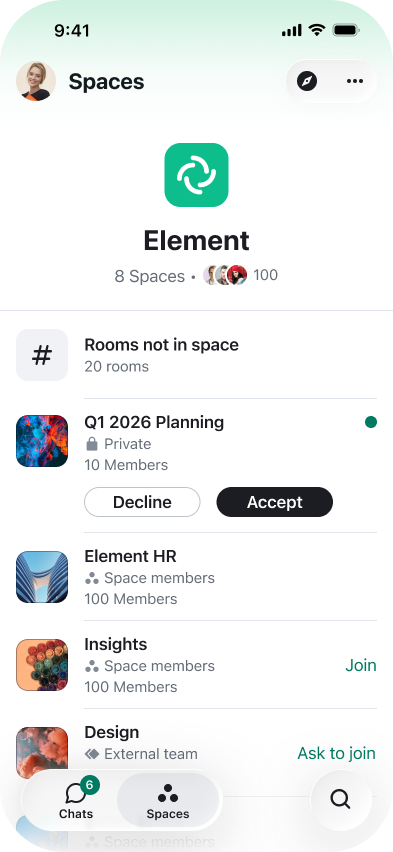
The dedicated Spaces tab serves as a central hub for joined and created Spaces, enabling users to actively manage their environment and expand their reach. This interface allows for the immediate discovery of rooms within existing Spaces that a user has not yet joined, while providing admins with direct controls to manage memberships, adjust settings, or link new rooms to the structure. It also facilitates the creation of entirely new Spaces, offering a unified location to build and govern organisational architecture from a single, intuitive interface.
3. Flexible room creation
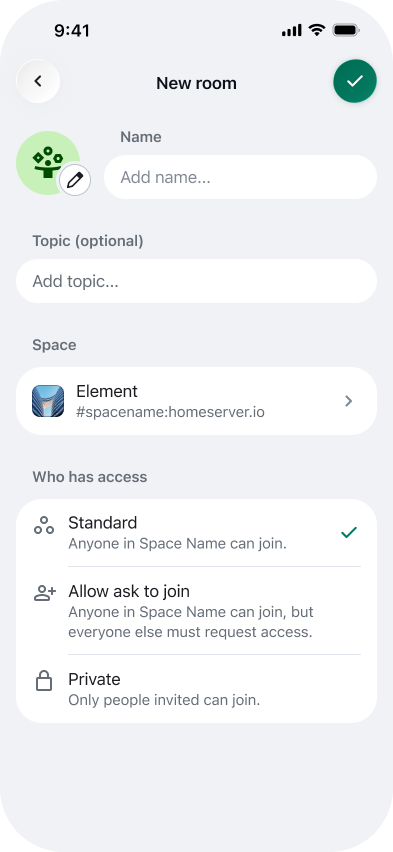
Organisation starts the moment you create a room. You can now choose exactly where a room belongs during the setup process. Attach it to a specific Space so your teammates can find it instantly, or keep it "spaceless" for your own private or general chats.
4. Context before you join
No more guessing what’s inside an invite. With Space previews, you can see a description, the member count, and who invited you before you hit accept. This transparency ensures users understand the scope of a community before entering.

Ready to dive in?
The wait is over. Spaces is one of the final pieces of the puzzle in making Element X the ultimate replacement for the "Element Classic legacy apps." It’s faster, it’s prettier, and it’s ready for you to use.
To get started, simply update your app to the latest version and look for the new Spaces icon!